rsAccessDenied or SSRS prompts for credentials
There are two very interesting error messages I used to get in every implementation of SSRS:
It prompts for credentials and/or get the following error message: User %s does not have required permissions. Verify that sufficient permissions have been granted and Windows User Account Control (UAC) restrictions have been addressed.
I got the following error message:The permissions granted to user %s are insufficient for performing this operation. (rsAccessDenied).
The solution is pretty simple for both cases:
Try to start the browser with elevated privileges – Run as administrator. It may happen in Windows Vista, 7, Server 2008 and newer OS’s where UAC is switched on.
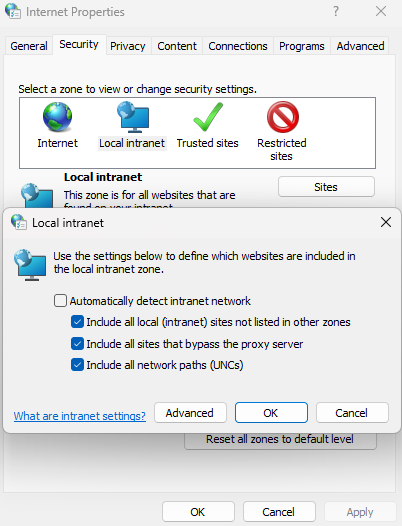
It is a more interesting scenario: the problem is not the UAC anymore, it is because of the browser security settings. In IE9, try to set the followings:
Start IE and go to Tools > Internet Options
navigate to the Security tab,
select the Local Intranet zone, then click on Sites button.
Uncheck the checkbox as in the picture below